Review your Google Takeout dates before you change them.
See date conflicts, choose which date to keep, and save checked JPEG copies on your Windows PC. Your original files stay unchanged.
Version 0.1.2-beta · unsigned beta · SHA256 published on the download page.
1. Scan locally
Pick your extracted Takeout folders. The app counts photos, JSON files and other media, and reads the dates already inside the files.
2. Review conflicts
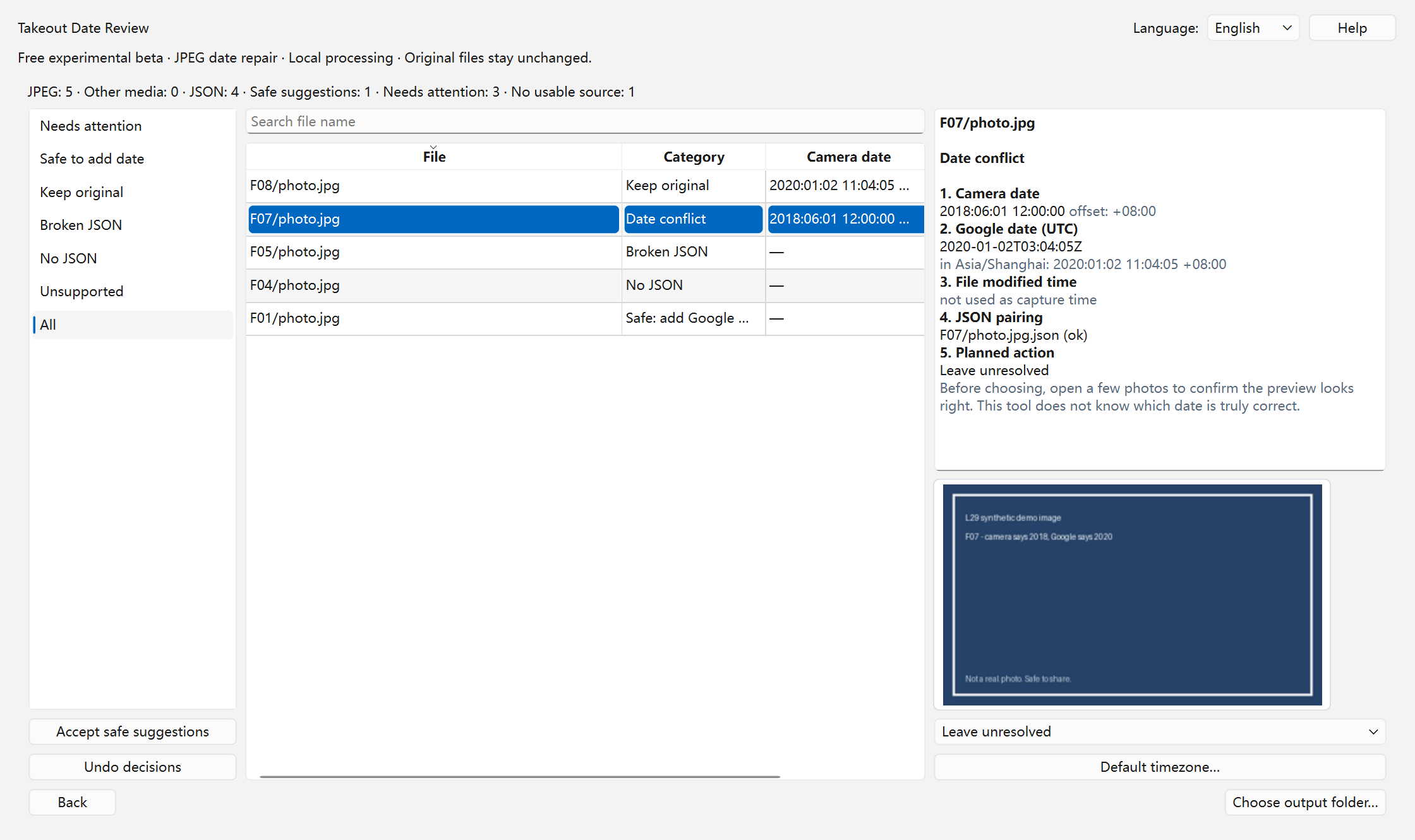
Each problem is separated: missing JSON, broken JSON, date conflict, unclear time zone, unsupported file. You decide; nothing is guessed.
3. Save and check copies
Copies go to a new folder. Every written date is read back, and a local report lists exactly what changed and what stayed unresolved.
What you actually decide
2018-06-01 12:00 (+08:00)
Date stored inside the photo file.
2020-01-02 03:04 UTC
Date from the Takeout JSON sidecar.
When the two disagree, the app shows both and asks you to keep the original, use Google's date, or leave the file unresolved. It does not decide which date is "truly" correct.
What it does
- Separates missing JSON, broken JSON and JSON without a capture time.
- Shows camera date and Google date next to each other before writing.
- Saves JPEG copies with verified date fields; originals are read-only.
- Reads every written value back and reports failures instead of hiding them.
- Copies unsupported and unresolved files unchanged and lists them separately.
Free trial
The first launch starts a 30-day free trial with every feature included. After 30 days, scanning, previewing conflicts and exporting unchanged copies still work, but saving repaired date copies needs the full version. The price and how to buy will be published on this site; no payment is accepted until then.
Current limits (trial version)
- You must extract the Takeout ZIP files first; ZIPs are not opened directly.
- JPEG/JPG only. HEIC, RAW, videos and PNG are copied unchanged, not repaired.
- It does not recover deleted photos and does not guess time zones from GPS.
- No cloud upload, no account, no telemetry. Feedback is a separate manual step.
Questions?
Read the guide to Takeout photo dates, check the privacy page, or send feedback on the feedback page.